
An Implementation Checklist to Claude Code in Large Codebases

This post turns the patterns from Anthropic’s “Claude Code at scale” article into an implementation checklist. Work through the phases in order — each layer builds on what came before, and skipping ahead is the most common reason setups underperform.
Mental model: it’s the harness, not just the model
Claude Code navigates your codebase the way an engineer would — reading files, grepping, following references — against the live source on the developer’s machine. There is no index to maintain and nothing to upload. That means quality is bounded by how easily Claude can find the right context, which is shaped by the harness you build around it.
The harness has five core extension points, plus two supporting capabilities:
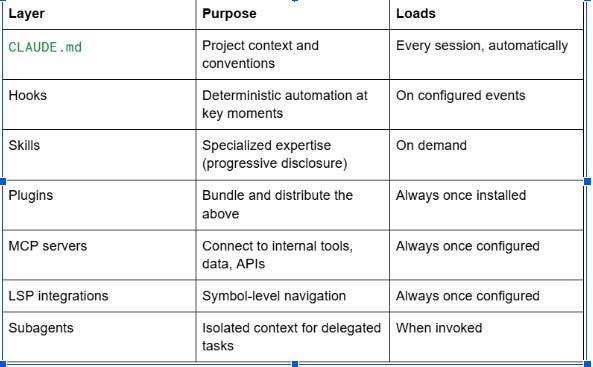
Build them in roughly the order listed. Teams that jump to MCP servers before their CLAUDE.md files are clean tend to get worse results, not better.
Phase 1: Lay the CLAUDE.md foundation
CLAUDE.md files are read automatically at session start. Claude walks up the directory tree from wherever it’s invoked and loads every CLAUDE.md it finds, so context layers naturally.
Do this first:
Write a root CLAUDE.md that contains only the big picture and critical gotchas. Pointers, not encyclopedias. Anything that doesn’t apply broadly belongs somewhere else.
Add subdirectory CLAUDE.md files for local conventions: the build command for this service, the test runner for this module, the naming rule for this domain.
Scope test and lint commands per subdirectory. Running the full repo suite for a one-service change wastes context and times out. Specify the right command in the local CLAUDE.md.
Tell developers to initialize Claude in the subdirectory they’re working in, not at the repo root. Root context is never lost because of the upward walk, but local context loads first.
Watch for drift: anything you find yourself repeating across CLAUDE.md files is probably a skill in disguise.
Phase 2: Add hooks for things that should be automatic
Hooks are scripts that fire at defined moments. Most teams underuse them by treating them only as guardrails. Their higher-leverage use is continuous improvement and consistent automation.
High-value hook patterns:
Stop hook that reflects on the session and proposes CLAUDE.md updates while the context is fresh. This is how your setup gets smarter over time without anyone scheduling it.
Start hook that loads team- or module-specific context dynamically, so developers don’t need to configure anything per directory.
Lint, format, and check hooks that enforce rules deterministically. Don’t ask Claude to remember to run the formatter — make it run.
If you’re writing a prompt instruction that says “always do X,” ask whether it should be a hook instead.
Phase 3: Build skills for specialized expertise
Skills are packaged instructions for specific task types. They load on demand, which is what makes them the right home for expertise that doesn’t apply to every session.
Use a skill when:
The expertise applies to one task type (security review, migration, deployment)
It would otherwise bloat every CLAUDE.md
It can be scoped to a path so it only activates in the relevant directory
Common mistake: dumping reusable expertise into CLAUDE.md because it’s the most familiar tool. If five sessions out of a hundred need the knowledge, it belongs in a skill — not in the file that loads every time.
Path-scope your skills aggressively. A payments-deploy skill bound to /services/payments won’t auto-load when someone is editing the frontend.
