
Chapter 6: Terminal UI Architecture (Claude Code vs. Hermes Agent)

Before you read on — two quick announcements. First, you can now get 50% off a yearly subscription and unlock all paid content on Agentic AI, AI Security, and more: https://kenhuangus.substack.com/subscribe?coupon=302342d9.
Second, all previously written 15 Hermes Agent and Claude Code agentic harness design patterns are now available in a single book on Amazon: https://www.amazon.com/Agentic-AI-Harness-Pattern-Patterns-ebook/dp/B0H13XWS8W
Previously in this series. This chapter builds on five earlier deep dives into the Claude Code and Hermes harness. If you are new here, read these first:
1. Pattern Summary
Terminal UI architecture is the rendering substrate of an agent harness — the layer that takes a stream of agent events (tokens, tool starts, tool completions, status changes) and turns it into a coherent, redrawable picture inside an 80-column box of cells. It is distinct from the input substrate (slash commands, key bindings) and from the content substrate (output styles, markdown rendering). The rendering substrate has its own concerns: how do you reconcile a React-style component tree against a fixed-cell terminal grid; how do you handle resize without flicker; how do you overlay a modal dialog without losing the conversation underneath; how do you keep two processes (agent core and TUI) in sync over a wire; how do you re-enter the alternate screen after the user backgrounds and resumes the process. Claude Code and Hermes solve the same set of problems with different process topologies — Claude Code runs the renderer in-process with the agent loop, while Hermes splits the agent and the TUI into separate processes connected by a JSON-RPC gateway.
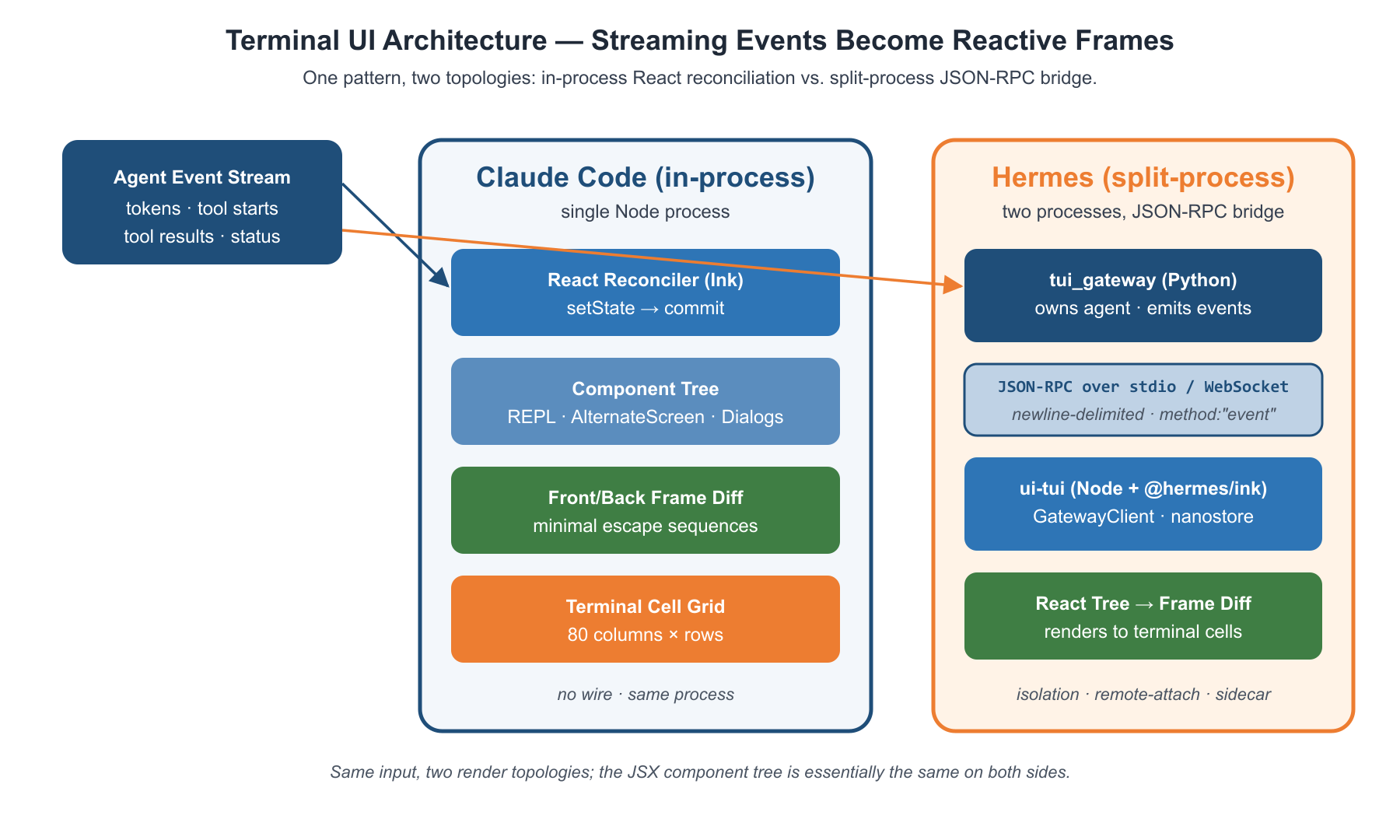
Figure 6.1. The same stream of agent events feeds two render topologies: Claude Code commits a React tree directly to the terminal cell grid in-process, while Hermes ships every event as JSON-RPC across a process boundary so a separate Node renderer can paint the same component tree.
2. Claude Code Implementation
Claude Code's rendering substrate is a fork of the Ink library that has been heavily customized for production-grade agent UX. The key insight is that Ink uses React-reconciler to commit a virtual DOM into a flat grid of terminal cells, with double-buffered frame diffing so each frame writes only the cells that changed. The agent loop is just another React component tree — streaming text becomes setState calls, tool starts become new child components, and the user never sees the seam between "model thinking" and "tool executing" because the same render scheduler drives both.
The Ink class as render owner
Ink is implemented as a single class that owns the React reconciler container, the front and back frame buffers, the focus manager, and the terminal I/O streams.
// src/ink/ink.tsx
export default class Ink {
  private readonly log: LogUpdate;
  private readonly terminal: Terminal;
  private scheduleRender: (() => void) & {
    cancel?: () => void;
  };
  private isUnmounted = false;
  private isPaused = false;
  private readonly container: FiberRoot;
  private rootNode: dom.DOMElement;
  readonly focusManager: FocusManager;
  private renderer: Renderer;
The container is the React reconciler root — it holds the fiber tree that React commits into. The frontFrame / backFrame pair is a classic double-buffer: the renderer paints into the back, then a diff against the front produces the minimal sequence of cursor-move + cell-write escapes to send to the terminal. The LogUpdate instance owns the relative-cursor invariants that let console.log and a redrawing UI coexist on the main screen.
Resize handling without flicker
Terminal resize is one of the trickier UX problems. When a user drags the window edge, the terminal can emit two or three resize events back-to-back, and the OS-reported stdout.columns value changes asynchronously. A naive renderer either flickers (clears the screen, then paints) or shows stale layout (paints with old columns, then re-flows). Ink's handler is deliberately synchronous and goes through an alt-screen-aware repaint path.
// src/ink/ink.tsx
private handleResize = () => {
  const cols = this.options.stdout.columns || 80;
  const rows = this.options.stdout.rows || 24;
  if (cols === this.terminalColumns && rows === this.terminalRows) return;
  this.terminalColumns = cols;
  this.terminalRows = rows;
  this.altScreenParkPatch = makeAltScreenParkPatch(this.terminalRows);
Same-dimension resize events are dropped immediately — emulators commonly emit two or three events for a single drag, and rendering each one would cause double or triple repaints. After a real change, the alt-screen branch resets the frame buffers and queues an ERASE_SCREEN to be folded into the next paint.
// src/ink/ink.tsx (continued)
  if (this.altScreenActive && !this.isPaused && this.options.stdout.isTTY) {
    if (this.altScreenMouseTracking) {
      this.options.stdout.write(ENABLE_MOUSE_TRACKING);
    }
    this.resetFramesForAltScreen();
    this.needsEraseBeforePaint = true;
  }
The needsEraseBeforePaint flag is the key to flicker-free resize. Writing ERASE_SCREEN synchronously in the resize handler would leave the terminal blank for the ~80 ms it takes React to reconcile the new layout. Instead, the erase is deferred into the next onRender's patch list, which writes the erase and the new content inside a single Begin-Sync-Update / End-Sync-Update block — atomic from the user's eye.
Alternate screen as a React component
The most distinctive pattern in Ink is treating the alternate screen as a JSX wrapper component, not a global mode flag. Mounting <AlternateScreen> enters DEC mode 1049; unmounting it exits and restores the main screen content. This means a transcript-overlay key like Ctrl+O can simply mount a different component tree.
// src/ink/components/AlternateScreen.tsx
export function AlternateScreen({ children, mouseTracking = true }: Props) {
  const size = useContext(TerminalSizeContext)
  const writeRaw = useContext(TerminalWriteContext)
  useInsertionEffect(() => {
    const ink = instances.get(process.stdout)
    if (!writeRaw) return
    writeRaw(
      ENTER_ALT_SCREEN + '\x1b[2J\x1b[H' +
      (mouseTracking ? ENABLE_MOUSE_TRACKING : '')
    )
    ink?.setAltScreenActive(true, mouseTracking)
    return () => {
      ink?.setAltScreenActive(false)
      ink?.clearTextSelection()
      writeRaw((mouseTracking ? DISABLE_MOUSE_TRACKING : '') + EXIT_ALT_SCREEN)
    }
  }, [writeRaw, mouseTracking])
  return <Box flexDirection="column" height={size?.rows ?? 24} width="100%" flexShrink={0}>{children}</Box>
}
The use of useInsertionEffect (not useLayoutEffect) is load-bearing — it fires during React's mutation phase, before resetAfterCommit runs Ink's onRender. If layout-effect were used instead, the first frame would paint to the main screen with altScreenActive=false, then the alt-screen would be entered, leaving a "broken view" frame visible behind the alt buffer.
Modal dialog overlays via dynamic imports
Concurrent dialogs (permission requests, settings validation, snapshot updates, teleport pickers) are launched as one-off React subtrees that resolve a Promise when the user picks an option. The dialogLaunchers.tsx module is a pure adapter — each launcher dynamic-imports its component, mounts it via showSetupDialog, and returns a Promise.
// src/dialogLaunchers.tsx
export async function launchSnapshotUpdateDialog(root: Root, props: {
  agentType: string;
  scope: AgentMemoryScope;
  snapshotTimestamp: string;
}): Promise<'merge' | 'keep' | 'replace'> {
  const { SnapshotUpdateDialog } = await import('./components/agents/SnapshotUpdateDialog.js');
  return showSetupDialog<'merge' | 'keep' | 'replace'>(root, done => (
    <SnapshotUpdateDialog
      agentType={props.agentType}
      scope={props.scope}
      snapshotTimestamp={props.snapshotTimestamp}
      onComplete={done}
      onCancel={() => done('keep')}
    />
  ))
}
The done callback is the dialog's only escape hatch. Whatever the user clicks resolves the outer Promise, and the agent loop that awaited the launcher continues. Because the dialog is just a React subtree mounted into the same Ink container, it inherits theme, focus, and key handling for free — there is no separate "dialog runtime."
Reactive streaming via state hooks
The agent loop turns into a render via React state. Streaming tokens accumulate in a state slice; a tool start pushes a new tool element into the tree; a tool completion replaces the in-progress element with its result. The REPL screen subscribes to useStdin, useTerminalSize, useTerminalFocus, and a dozen other hooks that all bottom-out in React context.
// src/screens/REPL.tsx (imports)
import { Box, Text, useStdin, useTheme, useTerminalFocus, useTerminalTitle, useTabStatus } from '../ink.js';
The render scheduler is throttled with lodash-es/throttle. When state updates come faster than FRAME_INTERVAL_MS, they coalesce into a single React commit, which produces a single frame diff, which produces a single batched write to the terminal. This is what keeps the UI responsive when 200 tokens per second are streaming in: one paint per frame interval, not one paint per token.
3. Hermes Agent Implementation
Hermes takes a fundamentally different topology. The agent core lives in a Python process; the TUI lives in a Node.js process; they communicate over JSON-RPC framed as newline-delimited JSON on stdio (or as messages on a WebSocket when running attached). The TUI process uses its own fork of Ink — published as @hermes/ink — but the renderer never touches the agent loop directly. Every event the user sees was JSON-encoded in Python, parsed in Node, dispatched to a nanostore, and triggered a React rerender.
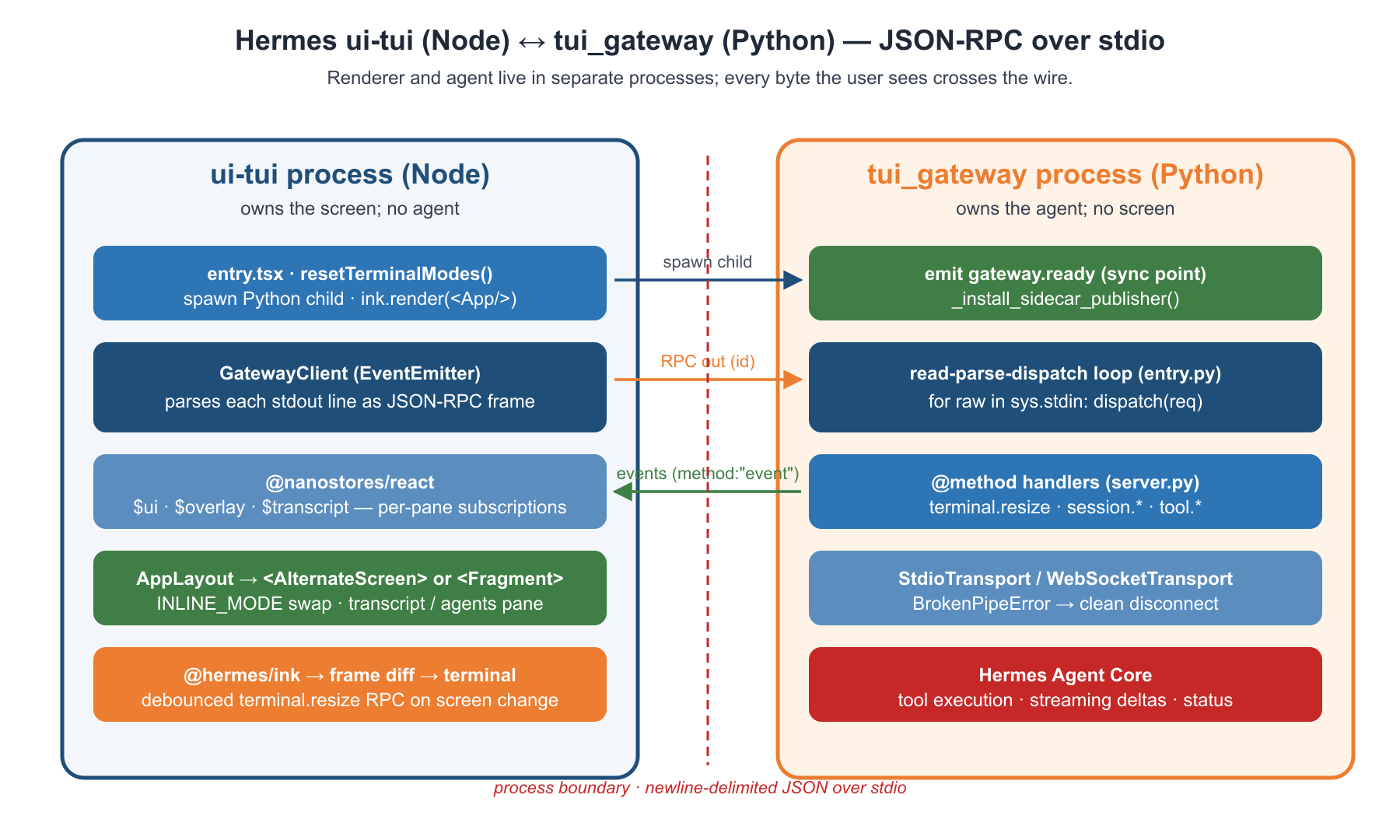
Figure 6.2. The Node ui-tui process owns the screen and runs GatewayClient, a nanostore, and the React tree; the Python tui_gateway owns the agent and runs the read-parse-dispatch loop. RPCs flow right (terminal.resize, prompt.send), events flow left (method:"event"), and BrokenPipeError is the protocol's clean-disconnect signal.
The TUI entry as a thin Node bootstrap
The TUI process starts by spawning the Python gateway as a child process and wiring up exit handlers. There is no agent in the TUI process — only a GatewayClient that pushes RPCs out and pulls events in.
// hermes-agent/ui-tui/src/entry.tsx
if (!process.stdin.isTTY) {
  console.log('hermes-tui: no TTY')
  process.exit(0)
}
resetTerminalModes()
const gw = new GatewayClient()
gw.start()
The first thing the entry does is reset terminal modes — a kill-9'd previous TUI can leave mouse tracking, bracketed paste, and Kitty keyboard mode all enabled, and the new process must clear them before its own React tree runs. Then the gateway client is constructed and started, which spawns the Python child.
// hermes-agent/ui-tui/src/entry.tsx (continued)
const [ink, { App }, { logFrameEvent }, { trackFrame }] = await Promise.all([
  import('@hermes/ink'),
  import('./app.js'),
  import('./lib/perfPane.js'),
  import('./lib/fpsStore.js')
])
ink.render(<App gw={gw} />, { exitOnCtrlC: false, onFrame })
The four imports are launched in parallel — the gateway is already booting Python in the background, so the parallelism here matters. By the time ink.render mounts the React tree, the gateway is usually past gateway.ready and the App can immediately fetch session state.
The gateway as a separate process
The Python gateway process is a JSON-RPC dispatcher built on stdin/stdout. It owns the agent, but it doesn't render. The TUI process owns the screen, but it has no agent. The boundary is the wire format. The gateway's first responsibility on startup is to emit gateway.ready, which is the synchronization point the TUI uses to begin fetching session state.
# hermes-agent/tui_gateway/entry.py
def main():
    _install_sidecar_publisher()
    if not write_json({
        "jsonrpc": "2.0",
        "method": "event",
        "params": {"type": "gateway.ready", "payload": {"skin": resolve_skin()}},
    }):
        _log_exit("startup write failed (broken stdout pipe before first event)")
        sys.exit(0)
After ready, the gateway becomes a synchronous read-parse-dispatch loop. Each iteration reads a JSON line from stdin, parses it, dispatches to the registered RPC handler, and writes the response back to stdout.
# hermes-agent/tui_gateway/entry.py (continued)
    for raw in sys.stdin:
        line = raw.strip()
        if not line:
            continue
        try:
            req = json.loads(line)
        except json.JSONDecodeError:
            if not write_json({"jsonrpc": "2.0", "error": {"code": -32700, "message": "parse error"}, "id": None}):
                _log_exit("parse-error-response write failed (broken stdout pipe)")
                sys.exit(0)
            continue
        method = req.get("method") if isinstance(req, dict) else None
        resp = dispatch(req)
        if resp is not None:
            if not write_json(resp):
                _log_exit(f"response write failed for method={method!r} (broken stdout pipe)")
                sys.exit(0)
Events that happen asynchronously — tool progress, streaming deltas, status changes — are pushed via the same write_json path, distinguished by a method: "event" field instead of a response id. The TUI's dispatch routes the two cases: an id match resolves a pending RPC promise, while a method === 'event' frame is published to the nanostore.
The transport abstraction
Because the gateway can run over stdio or attached WebSocket, the I/O sink is abstracted as a Transport protocol. The same dispatcher handles both transports without duplicating any business logic. The class header binds a stream getter and a lock — the getter is a callable so monkey-patching the underlying stream still works.
# hermes-agent/tui_gateway/transport.py
class StdioTransport:
    __slots__ = ("_stream_getter", "_lock")

    def __init__(self, stream_getter: Callable[[], Any], lock: threading.Lock) -> None:
        self._stream_getter = stream_getter
        self._lock = lock
The write method serializes outside the lock and then writes inside. Crucially, BrokenPipeError (and a small set of OSError errnos meaning "peer gone") returns False rather than raising — this is the protocol's clean-disconnect signal.
# hermes-agent/tui_gateway/transport.py (continued)
    def write(self, obj: dict) -> bool:
        line = json.dumps(obj, ensure_ascii=False) + "\n"
        with self._lock:
            stream = self._stream_getter()
            try:
                stream.write(line)
            except BrokenPipeError:
                return False
            except OSError as e:
                if e.errno not in _PEER_GONE_ERRNOS:
                    raise
                return False
            return True
The serialization happens outside the lock so a large payload — say, a 200KB tool result — cannot block other threads from emitting their own frames. The BrokenPipeError handling is the key wire-protocol invariant: when the TUI quits, the gateway sees a broken pipe and exits cleanly via the False return path, rather than crashing on an unhandled exception.
The gateway client as Node-side mirror
On the TUI side, GatewayClient is a Node.js EventEmitter that owns the Python child process, parses every line of stdout as a JSON-RPC frame, and routes responses back to in-flight RPC promises.
// hermes-agent/ui-tui/src/gatewayClient.ts
private startSpawnedGateway(root: string) {
  const python = resolvePython(root)
  const cwd = process.env.HERMES_CWD || root
  const env = { ...process.env }
  const pyPath = env.PYTHONPATH?.trim()
  env.PYTHONPATH = pyPath ? `${root}${delimiter}${pyPath}` : root
  this.startReadyTimer(python, cwd)
  this.proc = spawn(python, ['-m', 'tui_gateway.entry'],
    { cwd, env, stdio: ['pipe', 'pipe', 'pipe'] })
The startReadyTimer is one of the more nuanced parts of the contract: if the gateway doesn't emit gateway.ready within the configured timeout, the TUI surfaces a gateway.start_timeout event so the user sees something more actionable than a blank screen.
// hermes-agent/ui-tui/src/gatewayClient.ts (continued)
  this.stdoutRl = createInterface({ input: this.proc.stdout! })
  this.stdoutRl.on('line', raw => {
    try {
      this.dispatch(JSON.parse(raw))
    } catch {
      const preview = raw.trim().slice(0, MAX_LOG_PREVIEW) || '(empty line)'
      this.pushLog(`[protocol] malformed stdout: ${preview}`)
      this.publish({ type: 'gateway.protocol_error', payload: { preview } })
    }
  })
The dispatch routes parsed frames either to a pending RPC's resolver (when id matches) or to the event bus (when method === 'event'). This is what makes the TUI feel alive — every render the user sees is an event published from this stream, transformed into a patchUiState call, which triggers React to rerender the relevant pane.
Resize as a wire protocol message
Because the TUI process owns the terminal but the gateway's cols value affects how it formats output (markdown wrapping, diff column width), resize must round-trip across the wire. The TUI debounces 100 ms to avoid spamming the gateway, then sends a terminal.resize RPC.
// hermes-agent/ui-tui/src/app/useMainApp.ts
useEffect(() => {
  if (!ui.sid || !stdout) return
  let timer: ReturnType<typeof setTimeout> | undefined
  const onResize = () => {
    clearTimeout(timer)
    timer = setTimeout(() => {
      timer = undefined
      void rpc<TerminalResizeResponse>('terminal.resize', { cols: stdout.columns ?? 80, session_id: ui.sid })
    }, 100)
  }
  stdout.on('resize', onResize)
  return () => { clearTimeout(timer); stdout.off('resize', onResize) }
}, [rpc, stdout, ui.sid])
On the gateway side, the handler is trivial — it just stashes the new column count in the session state so subsequent renders use it.
# hermes-agent/tui_gateway/server.py
@method("terminal.resize")
def _(rid, params: dict) -> dict:
    session, err = _sess_nowait(params, rid)
    if err:
        return err
    session["cols"] = int(params.get("cols", 80))
    return _ok(rid, {"cols": session["cols"]})
This split — the TUI knows the screen, the gateway knows the agent, and terminal.resize is the only point where the two perspectives reconcile — is the architectural commitment of the gateway model.
Concurrent overlays via nanostore
Hermes does not use React Context for global UI state. It uses @nanostores/react, which gives it a synchronous, subscription-based store that any component can read without prop-drilling and without forcing parent rerenders. The overlay store is what drives modal switching.
// hermes-agent/ui-tui/src/components/appLayout.tsx
const Shell = INLINE_MODE ? Fragment : AlternateScreen
const shellProps = INLINE_MODE ? {} : { mouseTracking }
return (
  <Shell {...shellProps}>
    <Box flexDirection="column" flexGrow={1}>
      <Box flexDirection="row" flexGrow={1}>
        {overlay.agents ? (
          <PerfPane id="agents"><AgentsOverlayPane /></PerfPane>
        ) : (
          <PerfPane id="transcript">
            <TranscriptPane ... />
          </PerfPane>
        )}
      </Box>
Note the INLINE_MODE toggle: Hermes can render either inside the alternate screen (full-screen TUI with mouse tracking) or inline in the host terminal's scrollback. The Shell swaps between AlternateScreen and Fragment based on the env var, and the rest of the layout is identical. This is the same JSX-as-mode-switch pattern Claude Code uses for <AlternateScreen>, applied to a different problem (inline vs. fullscreen) rather than (modal vs. main).
4. Side-by-Side Comparison
The single biggest architectural difference between Claude Code and Hermes is process topology. Claude Code's renderer is a React tree mounted in the same Node process as the agent loop — setState from the loop directly schedules a render, and the React commit phase writes terminal escape sequences synchronously. There is no wire protocol because there is no wire. Hermes's renderer is a different process from the agent — every byte the user sees is JSON-encoded in Python, decoded in Node, dispatched to a nanostore, and rendered through React. This adds latency (a few milliseconds per event in the steady state) but buys process isolation: the Python agent can crash without taking down the TUI, the TUI can be backgrounded and reattached, and a remote dashboard can subscribe to the same event stream via a WebSocket sidecar transport.
The second difference is how the two systems handle alt-screen mode and overlays. Claude Code treats alt-screen as just another React component (<AlternateScreen>) that toggles DEC mode 1049 from a useInsertionEffect, mounted as a wrapper around the modal subtree. Modal dialogs are mounted by dynamic-importing the dialog component and resolving a Promise on the user's choice — a fully reactive flow with no separate dialog runtime. Hermes uses the same <AlternateScreen> JSX wrapper at the top of AppLayout, but its overlays come from a separate nanostore — $overlayState.agents flips a boolean and the layout swaps the transcript pane for the agents pane. Hermes's modals (approval dialogs, secret prompts) come down the wire as gateway events that flip the overlay store; Claude Code's modals are mounted directly by the agent loop's await of showSetupDialog.
The third difference is resize handling. Both systems debounce or de-duplicate resize events to avoid double-paints, but Claude Code's resize stays entirely in-process and uses a deferred-erase trick (needsEraseBeforePaint) to fold the screen-clear into the next atomic frame paint. Hermes's resize goes around an extra loop: the TUI debounces locally, then sends a terminal.resize RPC over the wire so the gateway's column count tracks the screen, then the next outbound rendered text from the agent uses the new column width. Hermes also has a unique concern Claude Code doesn't — backwards-compatibility between INLINE_MODE and full-screen mode, since the gateway can be embedded inside a host shell's scrollback rather than always taking over the screen.
5. When to Use Which
Use Claude Code's in-process rendering when:
You want minimum latency from agent state to pixel — there is no wire to cross, so a streaming token can reach the screen in a single React commit.
You're building an SDK-first product where the agent is embedded in a larger TypeScript app and you don't need to support the renderer running on a different host.
Your modal flow is
await showDialog(...)— Claude Code's dialog launchers turn a JSX tree into a Promise, and the agent loop just awaits it.
Use Hermes's gateway-plus-TUI architecture when:
The agent and the TUI must run on different machines or processes — for example, a Python agent in a Docker container with a Node TUI on the developer's laptop attached over WebSocket.
You need a sidecar transport that mirrors agent events to a separate dashboard, log aggregator, or monitoring system without modifying the agent.
The agent is in Python and the rendering library you want is in Node — Hermes's wire protocol decouples language choice from rendering choice.
Hybrid recommendation: Most production deployments need both modes. The right architecture is to make the rendering substrate transport-aware: an in-process React tree when the agent is local, a JSON-RPC client when it's remote. Claude Code's Ink instance and Hermes's GatewayClient could share a common interface — both produce a stream of GatewayEvent-shaped objects — and the React tree above could be identical. You get Claude Code's latency for local development and Hermes's process isolation for production deployment, with one component tree.
For paid subscribers — the applied build and a hands-on deep dive continue below.
Everything above is free: the full terminal-UI architecture of both Claude Code and Hermes, the side-by-side comparison, and when to use each. The paid section is where you build it for real. You get (1) a complete defensive-cyber SOC analyst console on the gateway-plus-TUI pattern — every file, from the per-panel nanostores to the wire handler to a destructive-remediation approval modal; (2) a concrete runnable example wiring a cost-threshold overlay from streaming event to cell grid; (3) how this pattern compares to MCP, A2A, and adjacent UI architectures; and (4) four project-driven Claude Code exercises you can land in a single focused session.
Unlock it — and every paid deep-dive across the Agentic AI and AI Security series — at 50% off a yearly subscription here: https://kenhuangus.substack.com/subscribe?coupon=302342d9.
