
CLAUDE CODE ORCHESTRATION
Dynamic Workflows · Subagents · Agent Teams

1. Introduction
For years, the developer’s relationship with AI followed a single pattern: chat and wait. Each task required constant human steering — babysitting the model through every intermediate step while watching the context window bloat with each turn. As conversations grew longer, focus degraded, and the session became a graveyard of volatile, non-repeatable logic.
Claude Code’s orchestration model shatters this constraint. With three distinct collaboration primitives — Dynamic Workflows, Subagents, and Agent Teams — developers can now match the execution model to the actual structure of the problem. Choosing the right primitive is no longer a nice-to-have; at enterprise scale it is a cost and quality decision.
The Core Insight
The question is no longer “How do I prompt Claude for this?” — it is “What execution model best fits the structure of this problem?” Dynamic Workflows, Subagents, and Agent Teams solve different problems. Using the wrong one wastes tokens, time, and trust.
This guide covers three things: what each primitive is, where it differs from the others, and how to pick the right one for your situation. It concludes with a scenario decision matrix you can use as a day-to-day reference.
2. Dynamic Workflows: The Orchestration Runtime
2.1 What Dynamic Workflows Are
Introduced in research preview on May 28, 2026, Dynamic Workflows are Claude Code’s new orchestration layer for problems that are too big for a single agent pass. The feature is available on Max, Team, and Enterprise plans across the Claude Code CLI, VS Code extension, Desktop app, and the Claude API (including Amazon Bedrock and Vertex AI).
The core mechanism: when you include the word “workflow” in a prompt, or when the /effort ultracode setting is active, Claude does not simply respond. Instead, it generates a JavaScript orchestration script on the fly. That script holds all loops, branching logic, and intermediate variables. Claude then runs the script, which fans work out across tens to hundreds of parallel subagents, has adversarial agents attempt to refute findings, iterates until answers converge, and returns only the verified result.
The Paradigm Shift
In standard Claude Code, Claude IS the orchestrator — making turn-by-turn decisions whose intermediate results accumulate in the context window. In Dynamic Workflows, a generated JavaScript script IS the orchestrator. Claude’s context window holds only the final verified answer, not the exhaust of every intermediate step.
2.2 Key Technical Properties
Scale: up to 1,000 agents per workflow run, with 16 running concurrently to bound local resource use
Adversarial verification: independent agents are tasked with refuting each other’s findings; only claims that survive cross-examination are surfaced
Convergence-driven iteration: the workflow keeps spawning agents and iterating until answers stabilize — the number of passes is determined by the work, not preset by the user
Caching-backed resumability: if a run is paused or interrupted, completed agents return cached results instantly on resume; no work is repeated
Background execution: runs do not block the CLI; you can continue working while agents execute
Inspection: use /workflows view to drill into any phase, inspect prompts, and examine tool calls without stopping the engine
Activation: include the word ‘workflow’ in your prompt, or set /effort ultracode for automatic triggering
2.3 Built-in Workflow: /deep-research
The /deep-research command is the premier bundled workflow. Unlike standard search tools that accept the first plausible answer, /deep-research is explicitly designed to disprove its own findings. It fans searches across multiple angles, cross-checks sources against one another, holds an internal vote on each claim, and includes only claims that survive adversarial scrutiny. The output is a cited research report with a higher reliability bar than a single-pass AI search.
2.4 Built-in Workflow: /effort ultracode
Setting effort to ultracode activates automatic workflow orchestration. In this mode Claude evaluates each request and decides on its own whether the task warrants a workflow. When it does, Claude plans an understand-change-verify loop: one subagent cluster to map the architecture, a second to execute changes, a third to verify results. This loop runs automatically. Token cost and time are higher than a standard prompt, but success rates on multi-stage engineering tasks are substantially better.
2.5 When to Use Dynamic Workflows
Use Dynamic Workflows when three conditions are present together: the task is too large for a single context window, the split strategy is unknown in advance, and result quality is more important than token economy. Canonical use cases include:
Large-scale migrations: applying consistent transformation logic across 500+ files in an enterprise codebase
Codebase-wide security audits: hunting for specific vulnerability classes or architectural drift across every file in a repository
Exploratory bug hunts in unfamiliar codebases: no prior knowledge of how to partition the work
Plans that need stress-testing from multiple angles before commitment
Any task where independent adversarial review of findings is required before results reach you
When NOT to Use Dynamic Workflows
Avoid Dynamic Workflows for repeatable, well-defined tasks with predictable token budgets. If you already know the exact workflow and want consistent, cost-predictable execution, a custom Subagent is more efficient. Dynamic Workflows are also overkill for small, bounded tasks where a single agent pass is sufficient.
3. Subagents: Repeatable Specialist Workers
3.1 What Subagents Are
Subagents are temporary worker instances launched from the current session. Each subagent receives its own isolated context window, executes its task, and returns only a summary of the result. The calling session never absorbs the subagent’s intermediate logs or raw output — only the final answer. This keeps the orchestrating session clean and its context focused.
Claude Code ships three built-in subagent types that cover the most common delegation patterns:
Explore: read-only; designed for rapid codebase search and context gathering without risking writes
Plan: read-only; gathers background information during plan mode while the main session continues
General-purpose: read and write access; suitable for tasks that mix exploration and execution
3.2 Custom Subagents
When built-in types are insufficient, you can define custom subagents as Markdown files with YAML front matter. Store them in .claude/agents/ (project-scoped) or ~/.claude/agents/ (user-scoped, available across all projects). The key configuration fields are:
description: the primary trigger signal — Claude reads this to decide when to invoke the subagent automatically; precision here determines reliability
tools: constrains which tools the subagent can use, enforcing least-privilege
model: select sonnet, opus, haiku, or inherit from the parent session
permissionMode: controls file-edit permissions and prompt behavior
memory: optionally provides a cross-conversation memory directory
The description field deserves emphasis. Claude uses it as an automatic invocation trigger — the more precisely it describes both the task and the right moment to invoke the subagent, the more reliably it fires without explicit user prompting.
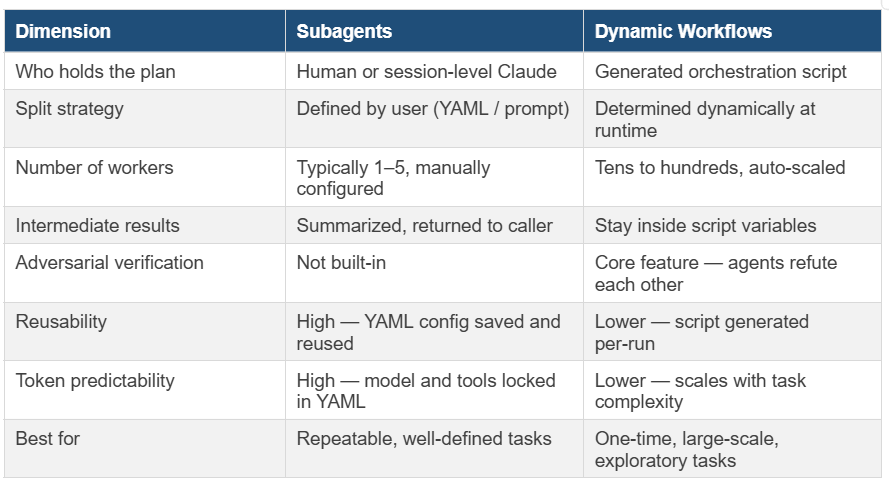
3.3 How Subagents Differ from Dynamic Workflows
The clearest distinction is who holds the plan and who determines the split strategy.
With a standard subagent, you — or Claude’s turn-by-turn reasoning — decide which subagent to spawn, when, and how to aggregate results. The orchestration logic lives in your head or in the session. Subagents are the execution units; the coordination is human-directed.
With Dynamic Workflows, Claude generates the orchestration script itself. The script decides how many subagents to spawn, how to partition the work, when to run adversarial verification passes, and when results have converged sufficiently to stop. The orchestration burden shifts from human to machine. Dynamic Workflows can also internally spin up subagents as part of the workflow — so the two mechanisms are composable, not exclusive.
3.4 When to Use Subagents
Subagents excel when you need consistent, cost-predictable execution of a well-defined task. Canonical use cases:
Code review enforcing a specific team style guide — define once, invoke on every PR
Test generation against a known framework — same prompt, same tools, same model, every time
Documentation updates following a fixed template — deterministic, auditable output
Parallelizing independent tasks with no ordering dependencies (e.g., fix bug in service A while reviewing PR in service B)
Any context isolation need — offload a long-running read task to keep the main session clean

4. Agent Teams: Collaborative Specialist Squads
4.1 What Agent Teams Are
Agent Teams launched as a research preview in February 2026 (Claude Code v2.1.32). They enable multiple Claude instances to work in parallel on different subtasks while coordinating through a git-based shared workspace. Unlike manual multi-instance setups where you orchestrate separate Claude sessions by hand, Agent Teams provide built-in coordination — agents claim tasks, merge changes continuously, and resolve conflicts automatically.
The key requirement is Opus 4.6 minimum. Agent Teams are designed for complex, interdependent work where multiple specialists must produce output that is eventually unified into a single coherent artifact — typically a codebase.
4.2 How Agent Teams Work
Each member of an agent team is a fully independent Claude session with its own context, its own tool access, and its own area of responsibility. Coordination happens through a shared git repository:
Agents claim work items to avoid duplication
Changes are merged continuously as agents complete subtasks
Conflicts are resolved automatically by the coordination layer
The team keeps running until all claimed work is complete and merged
This coordination model means agents are not just parallel workers — they are aware of each other’s progress and output. A backend agent knows when the API contract it must conform to has been updated by a frontend agent.
4.3 How Agent Teams Differ from Subagents and Dynamic Workflows
The critical difference from Subagents is the coordination model. Subagents are independent — they do not communicate with each other or share state. They receive a task, complete it, return a result, and disappear. Agent Teams are collaborative — members share a working environment, observe each other’s changes, and coordinate around a common artifact over time.
