
Skill is now first class citizen in your ai workflow, not prompt anymore - a practical guide

If you’re still pasting the same instructions into a chat box every morning, you’re losing hours you’ll never get back. This 8,000-word technical masterclass reveals the architecture separating AI prompters from AI system architects — and how to cross that divide today.
Inside: how to build permanent, version-controlled Claude Skills that boot up instantly with full context; how to hand off computation to local Python scripts so the AI never hallucinates a number again; how to wire up live databases via MCP so natural language replaces SQL; five production-ready enterprise blueprints; and a CI/CD testing framework that catches instruction drift before it breaks your workflow.
Why do we need skill in AI Workflow?
I want you to audit how you started your workday today.
Did you open up Claude or ChatGPT, start a fresh chat, and paste in a massive block of text telling the model to “act like a senior copywriter” or “be an expert Python developer”? Did you have to remind it about your company’s specific code formatting rules? Did you have to correct it when it inevitably hallucinated a library or forgot to use markdown headers?
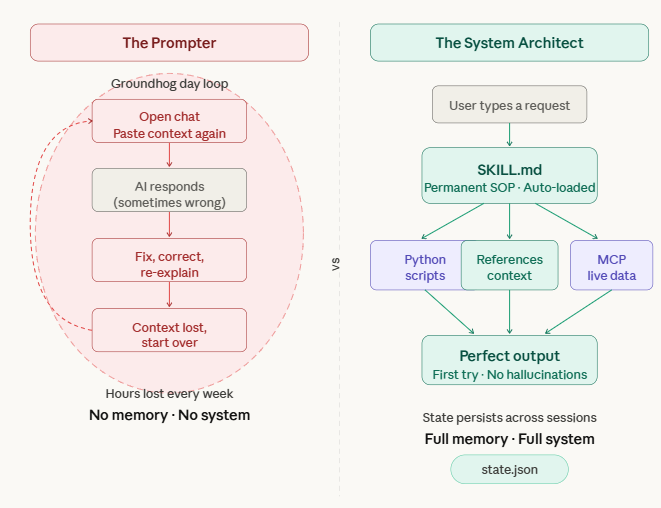
If so, you are caught in the “Groundhog Day” loop of AI. You are treating a supercomputer like an amnesiac intern.
Over the past year, a massive technical divide has formed in the AI community. On one side, we have Prompters. Prompters rely on transitory text. They think they are being productive because the AI writes code or copy faster than they do, but they are bleeding dozens of hours every month on setup, context-loading, and revisions.
On the other side, we have System Architects. Architects do not write prompts. They build automated, stateful, locally-hosted configurations that boot up instantly. When an Architect types “Draft the Q3 architectural review,” the AI already knows the company’s technical standards, has read the Q2 review from a local directory, has queried the live Jira database via an API, and outputs a flawless document on the first try.
The primitive that makes this possible? Claude Skills.
With the quiet evolution of local AI execution and the release of the Model Context Protocol (MCP), the concept of “prompting” is dead. Skills are now first-class citizens in your AI workflow. A Skill is a permanent, executable, version-controlled repository that lives on your machine. It tells the AI exactly how to behave, what external Python scripts to run, and what databases to query.
This is the most exhaustive, technically rigorous, and practical guide to building AI Skills on the internet. By the time you finish this 8,000-word masterclass, you will understand local configurations, vector routing, Python compute handoffs, MCP server deployments, and enterprise-grade CI/CD testing for AI.
Part 1: Deconstructing the Ecosystem (Projects vs. MCP vs. Skills)
Before we write a single line of code, we need to clear up the widespread architectural confusion. Developers constantly mix up Anthropic’s various features. Let’s define the stack clearly.
Think of building an AI system like onboarding a human software engineer:
Projects (The Knowledge Base): When you upload a 50-page API documentation PDF or a massive codebase into a Claude Project, you are giving the AI static reference material. It is passive knowledge. It is the company wiki.
MCP / Model Context Protocol (The Access Credentials): This is the bridge to the outside world. MCP is an open-source standard that gives Claude the ability to securely reach into your live tools—your Slack workspace, your local PostgreSQL database, or your GitHub repositories.
Skills (The Execution Engine): This is the focus of our guide. A Skill is a permanent, executable instruction file (SKILL.md) that lives on your local file system. It is the Standard Operating Procedure (SOP). It tells Claude exactly what steps to take, which python scripts to execute, and which MCP tools to invoke when a specific user request occurs.
The Golden Rule: If you have typed the same set of instructions into a chat interface more than three times, it is a catastrophic waste of your time. It needs to be codified into a Skill.
Part 2: The Anatomy and Routing of a Local Skill
Let’s pop the hood. A Skill is not a mystical AI concept living in the cloud; it is literally a directory on your local machine.
To create a Skill, you build a folder inside your hidden Claude configuration directory.
Mac/Linux: ~/.claude/skills/
Windows: %USERPROFILE%\.claude\skills\
Inside that folder, the architecture is strictly defined by Claude’s local parser. For a production-grade Skill, your folder structure must look like this:
your-custom-skill-name/
├── SKILL.md # The Brain: YAML routing logic + Markdown execution steps
├── references/ # The Memory: Static context files (Max 1 level deep)
│ ├── system_architecture.md
│ └── code_style_guidelines.txt
├── scripts/ # The Muscle: Python/Node execution scripts
│ ├── parse_logs.py
│ └── scrape_web.js
└── schemas/ # The Guardrails: JSON validation schemas
└── output_format.json
How Claude Routes Your Request
When you type a message into Claude Desktop or Claude Code, it doesn’t just read your text. Behind the scenes, Claude’s local engine runs a Semantic Vector Search against the YAML frontmatter of every Skill in your ~/.claude/skills/ directory.
If your request semantically matches the description and triggers defined in a Skill’s YAML, Claude intercepts the request, silently injects the entire SKILL.md (and associated references) into the context window as a system_prompt, and shifts into execution mode. You never see the prompt happen.
